
Notice
Recent Posts
Recent Comments
Link
| 일 | 월 | 화 | 수 | 목 | 금 | 토 |
|---|---|---|---|---|---|---|
| 1 | 2 | 3 | 4 | 5 | 6 | |
| 7 | 8 | 9 | 10 | 11 | 12 | 13 |
| 14 | 15 | 16 | 17 | 18 | 19 | 20 |
| 21 | 22 | 23 | 24 | 25 | 26 | 27 |
| 28 | 29 | 30 | 31 |
Tags
- jinja2
- bootstrap4 패키지
- 명령어
- 튜토리얼
- Django
- #endif
- #ifndef
- PyQt5
- 사이트 도메인
- flask
- OpenCV + Flask
- OpenCV
- openweathermap
- javascript
- #ifdef
- MySQL 세팅
- bootstrap
- VS Code
- 콘솔 가상환경 # 콘솔 #가상환경
- #else
- 환경변수 설정
- 실시간 시계
- 성능지표
- DB 데이터
- Action
- #undef
- href
- #if
- DB 데이터 저장
- heroku
Archives
- Today
- Total
PROGRAMMING
Flask 실습 - 위, 경도 및 거리에 따른 약국 표시 본문
● Open API - Flask
: '/pharm'
mongodb → pharm_2019.csv
현재위치: 위도, 경도
※ 한국it교육원
: 위도 - 35.88107, 경도 - 128.62707
1. app.py
from bson import ObjectId, SON
from pymongo import MongoClient, GEOSPHERE

...

@app.route('/pharmacy_search', methods=['GET'])
def pharmacy_search():
    if check_root != 2:
        return render_template('error.html', id="로컬이 아닌 잘못된 접근입니다.")

    client = MyMongoClient("kim_db", "pharmacy")
    client2 = MyMongoClient("kim_db", "modify_pharmacy")
    modify_pharmacy = client2.get_collection()
    cursor = client.get_collection().find()
    for cur in cursor:
        if cur.get('경도') == None:
            continue
        phar_loc = {'type': 'Point'}
        phar_loc['coordinates'] = [float(cur.get('경도')), float(cur.get('위도'))]
        bookJson = {'pharmacyName': cur.get('약국명'), 'location': phar_loc}
        modify_pharmacy.insert_one(bookJson)
    modify_pharmacy.create_index([('location', GEOSPHERE)])
    query = {'location': {'$near': SON([('$geometry', SON([ ('type', 'Point'), ('coordinates', [128.62707, 35.88107]) ])),
                                   ('$maxDistance', 1000)])}}
    pharmacy = modify_pharmacy.find(query)

    return render_template('hkit_pharmacy.html', pharmacy=pharmacy)

...
2. hkit_pharmacy.html
{% extends "layout.html" %}
{% block contents %}

    <meta name="viewport" content="width=device-width, initial-scale=1.0">
    <div id="map" style="width: 800px; height: 800px">

    </div>

<script>
    function initMap() {
        const myLatLng = { lat: 35.88107, lng: 128.62707 };
        const map = new google.maps.Map(document.getElementById("map"), {
            zoom: 15,
            center: myLatLng,
        });
        {% for item in pharmacy %}
            new google.maps.Marker({
                position: { lat: {{ item.location.coordinates[1] }}, lng: {{ item.location.coordinates[0] }}},
                map,
                title: "{{ item.pharmacyName }}",
            });
        {% endfor %}
        new google.maps.Marker({
            position: myLatLng,
            map,
            title: "한국it교육원",
        });
    }
</script>

<script defer src="https://maps.googleapis.com/maps/api/js?key=AIzaSyBCpc4z6aJzR641DNuhibEoENiscudQm3I&callback=initMap">
</script>

{% endblock %}
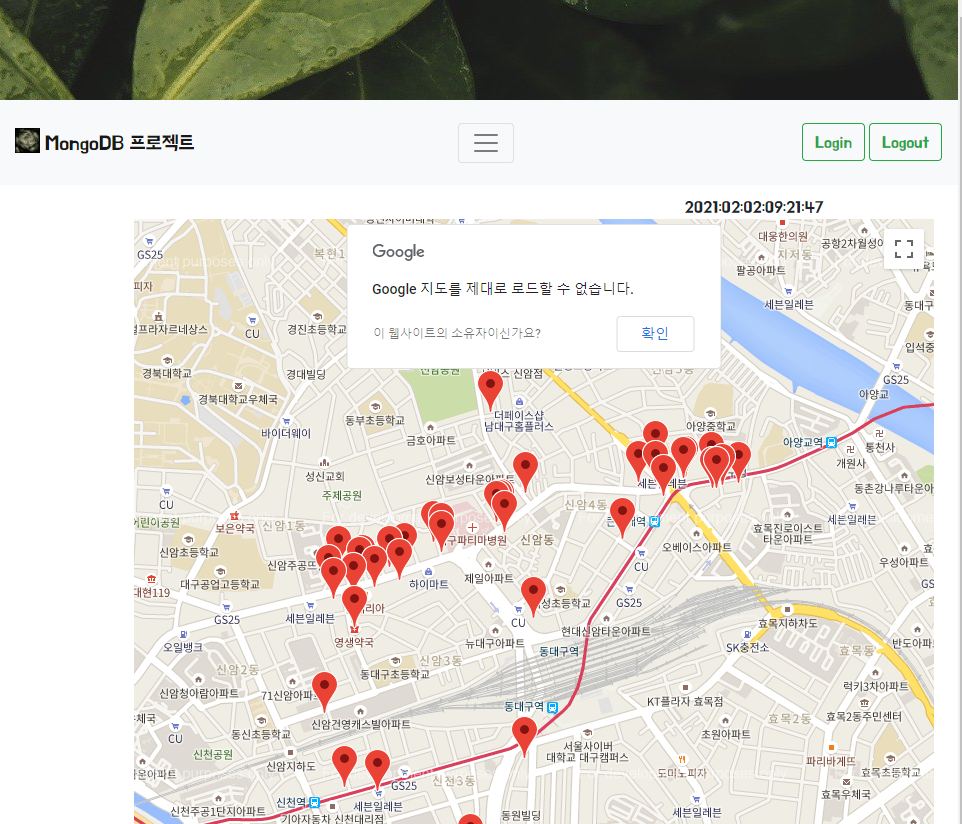
3. 결과 화면(로컬로 접속한 이후 가동할 수 있도록 DB를 로컬로 넣음 - 커서를 댈 경우 약국이름 표시)
'HTML > Flask' 카테고리의 다른 글
| HTML 실습 - Naver 영화 예매 (0) | 2021.01.28 |
|---|---|
| 웹 프레임워크 Flask - 3 (BootStrap, CSS, font, OpenWeatherMap) (0) | 2021.01.28 |
| 웹 프레임워크 Flask - 2 (0) | 2021.01.28 |
| HTML 실습 - 로또 번호 비교 (0) | 2021.01.27 |
| 웹 프레임워크 Flask - 1 (0) | 2021.01.26 |
'HTML/Flask' Related Articles
more


Comments